Design and business resources, curated with intention

the journal
showit  |  Marketing  |  branding  |  resources  |  seo  |  Web design

by CATEGORY

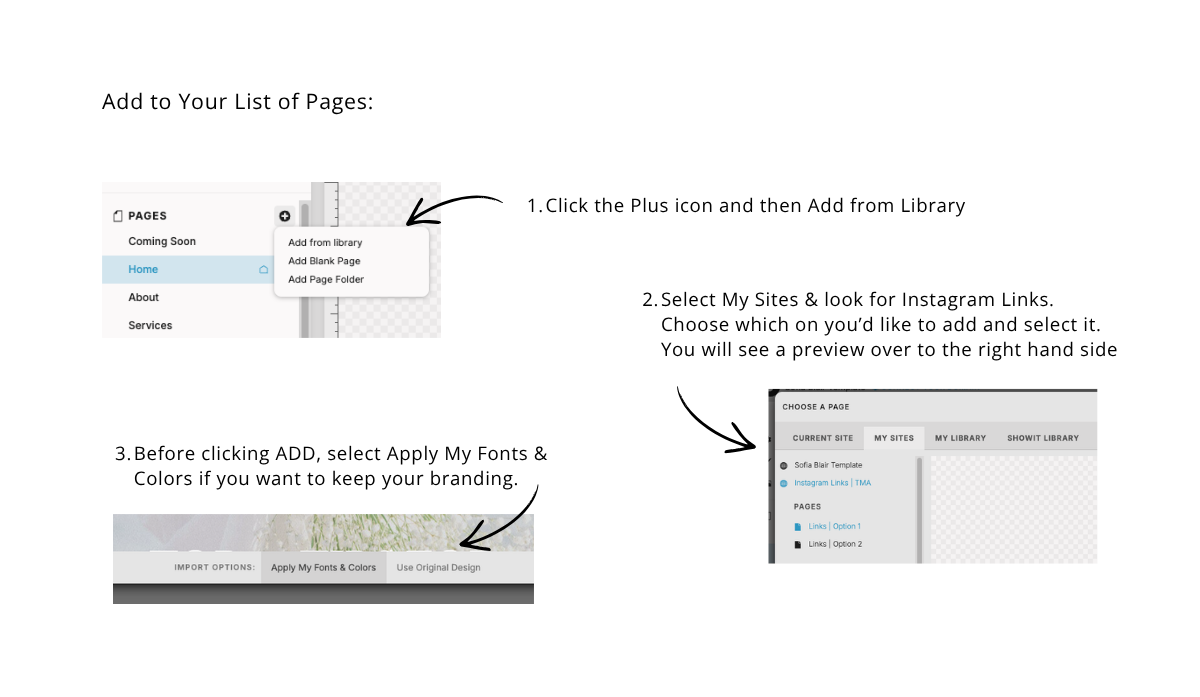
If you’ve purchased or downloaded a Showit template, the next step is adding it to your website. This process is simple once you know where to look, but if you’re new to Showit, it can feel a little hidden at first. Below, you’ll find a clear step-by-step guide to help you install your page and […]

If you’ve purchased or downloaded a Showit template, the next step is adding it to your website. This process is simple once you know where to look, but if you’re new to Showit, it can feel a little hidden at first. Below, you’ll find a clear step-by-step guide to help you install your page and […]

If you ever need to give your designer, copywriter, or SEO specialist access to your Showit account without sharing your personal login, Showit makes it easy to add them as a contributor. This is one of the first things I ask clients to do when we start a project together, and it only takes a […]

If you ever need to give your designer, copywriter, or SEO specialist access to your Showit account without sharing your personal login, Showit makes it easy to add them as a contributor. This is one of the first things I ask clients to do when we start a project together, and it only takes a […]

When I first started designing websites for my photography business, I used ProPhoto. It worked for a while. But over time, the layout tools started feeling clunky. I found myself spending way too much time figuring out rows, columns, and how to make things look just right. Eventually, I got tired of the tech headaches […]
When I first started designing websites for my photography business, I used ProPhoto. It worked for a while. But over time, the layout tools started feeling clunky. I found myself spending way too much time figuring out rows, columns, and how to make things look just right. Eventually, I got tired of the tech headaches […]

Featured Blog Posts