
How to add a template to your Showit account
If you’ve purchased or downloaded a Showit template, the next step is adding it to your website.
This process is simple once you know where to look, but if you’re new to Showit, it can feel a little hidden at first.
Below, you’ll find a clear step-by-step guide to help you install your page and start customizing it to fit your brand.
Step One is to add the template to your account.
Begin by logging into your Showit account.
Click on your name at the bottom left corner
Click Add to Library
Paste in your Share key
Click Begin with this design
Step Two is to add the pages into your current design
Make sure you click on your Site panel in the upper left
Click the plus icon next to Pages and select Add from Library
Select My Sites & look for Instagram Links or your purchased template. Choose which one you’d like to add and select it. You will see a preview over to the right.
Before clicking ADD, select Apply My Fonts & Colors if you want to keep your branding.
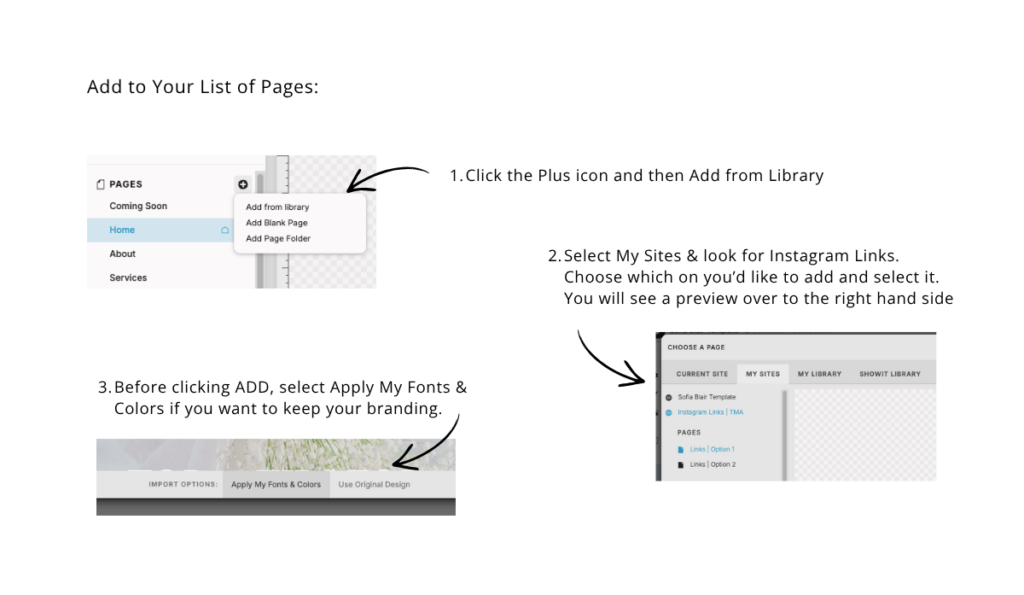
Now it appears in the bottom of your pages list and is ready for you to customize with your own text and links.
A Quick Note Before You Publish
Before sharing your page, take a moment to:
- Test each link
- Review spacing on mobile
- Make sure your branding feels consistent
A few small adjustments here can make a big difference in how your page feels to your audience.

